Adding quaternion scene node transformation support into Irrlicht engine.
In this article I will talk about adding support of quaternion transformation in Irrlicht graphic engine. This example could be useful for any other open source game engines. More about quaternion’s
Author: Sergey Taraban
:ad:Why we need quaternion based transformation in Irrlicht.
Irrlicht – simple and very useful game engine. But he still have lack of support of quaternion rotation transformation for game objects in scene. You can set scene node transform only by Euler angles. This leads to such problems as:- Gimbal lock.
- Improper transformation after Importing scene objects from graphic software like 3ds max, Maya, Blender etc. li>
- ”Ready to use” code implementation from other engines or samples from internet.
 After computation we got this matrix:

Another unpleasant surprise awaits you if you import the scene from 3D graphic editor, for example Autodesk 3ds Max. It stores transformation in quaternions and in Irrlicht you need to convert them to the Euler angles. As a result, some of the objects in scene will be rotated very oddly or even wrong because of Gimbal lock, or because the conversion algorithm to the Euler angles because it can produce different Euler angles for the same quaternion.
In order to solve these problems we need to use quaternions for vertex position transformation. In this case, vertex position multiplies with quaternion, not matrix. Quaternions also can be multiplied by each other as well as the matrix. In this case, the resulting quaternion will save the entire sequence of rotation transformations and will guarantee their independence. Here, I should mention an important point. Quaternion can be converted into a rotation matrix, but this matrix will not have quaternion’s features. This rotation matrix is obtained from the Euler angles and will lead to Gimbal lock. So don’t use it instead of quaternion.
Gimbal lock live sample.
Consider the test scene in 3ds max. Each branch of this fake tree - the same cone, which has a different transformation of the rotation, scale and position. Let's try to load this scene in Irrlicht. For max exporting I use my own script written on MAXScript. And, in order to load into my engine I just parse scene file, which contains transformation for each scene object.On the screenshot below: The standard 3ds max scene:

and here below is how this will be in Irrlicht without quaternion transformation support:

Here is the scene in Irrlicht with quaternion transformation support:
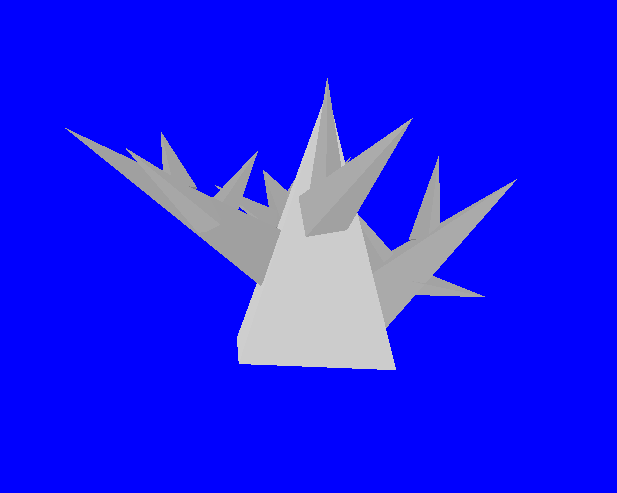
As you see now the scene in Irrlicht is displayed correctly.
Implementing.
There is a good quaternion class in Irrlicht library irr::core::Quaternion, which supports all necessary operations with quaternions. So we only need to add new methods to the interface ISceneNode and add implementations for each of the graphic drivers. In this article I'll show how to add support for quaternions for OGLESDriver (OpenGL ES 1.0) and OGLES20Driver (OpenGL ES 2.0). For other drivers there are all the same. The main depending is how you have implemented the vertex transformation - by fixed pipeline or in the shader. I will describe those two variants in example of these two drivers.The first that we do is adding private field Quaternion RelativeRotationQ, methods setRotationQ() and getRotationQ() in class ISceneNode. It is needed for objects can be transformed using a quaternion.
core::quaternion RelativeRotationQ;

virtual void setRotationQ(const core::quaternion& rotation)
{
RelativeRotationQ = rotation;
}
virtual const core::quaternion& getRotationQ() const
{
return RelativeRotationQ;
}
Add setTransformQ method for IVideoDriver interface
virtual void const setTransformQ( core::quaternion q ) = 0; And its realization in default driver CNullDriver
const void CNullDriver::setTransformQ( core::quaternion q )
{
    RotationTransformQuat = rot;
}
And don’t forget to add field core::quaternion RotationTransformQuat;
Next add code below in all realization of ISceneNode interface in function render() before setTransform calling.
driver->setTransformQ(RelativeRotationQ);
For example like in function CMeshSceneNode::render()
…
driver->setTransformQ(RelativeRotationQ); //here is our code
driver->setTransform(video::ETS_WORLD, AbsoluteTransformation);
Now lets move to driver realization code.
For OpenGL ES 1.0 and OpenGL FFP (fixed pipeline) simply add code below into setTransform function:
case ETS_WORLD:
{
    glMatrixMode(GL_MODELVIEW);
    glLoadMatrixf(Matrices[ETS_VIEW].pointer());
    glMultMatrixf(Matrices[ETS_WORLD].pointer());
    //quaternion rotation support code
    float angle = 0.0f;
    core::vector3f axis;
    RelativeRotationQ.toAngleAxis(angle, axis);
    glRotatef(angle*core::RADTODEG, axis.X, axis.Y, axis.Z);
}
For the performance reason I recommend you to think about moving quaternion conversion come in some other place.
Adding quaternion transformation for OpenGL ES 2.0 will be somewhat more complicated. First, we need to modify the glsl vertex shader COGLES2FixedPipeline.vsh for support quaternion multiplication.
Add a new uniform fvQuatRotation. We will use this variable for pass a quaternion into shader.
uniform vec4 fvQuatRotation;
Now let’s add the function of the quaternion multiplication with vector:
I will write two versions of quaternion multiplication algorithm for GLSL shader - one without optimization, and the second - with optimization. Unoptimized variant:
vec4 quatMultyQV( vec4 q, vec4 v )
{
    return vec4(quatMultyQQ(q, quatMultyQQ(vec4(v.xyz, 0.), getConjugate(q))).xyz, v.w);
}
vec4 quatMultyQQ( vec4 q, vec4 rq )
{
return vec4( cross(q.xyz, rq.xyz) + q.w*rq.xyz + rq.w*q.xyz, q.w*rq.w - dot(q.xyz, rq.xyz) );
}vec4 getConjugate( vec4 q )
{
return vec4(-q.x, -q.y, -q.z, q.w );
}Optimized variant:
vec4 quatMultyQV( vec4 q, vec4 v ) //q- quaternion, v – vector for transform action
{
vec3 x = q.xyz;
float w = q.w;
vec3 a = cross(x,v.xyz) + w*v.xyz;
return vec4((cross(a,-x) + dot(x,v.xyz)*x + w*a), v.w);
}
Then write the code of vertex transformation:
// inVertexPosition - attribute vec4
vec4 inRotVertexPosition = quatMultyQV( fvQuatRotation, inVertexPosition);
vec4 fvObjectPosition = matWorld * inRotVertexPosition;
gl_Position = matViewProjection * fvObjectPosition;
Now return to Irrlicht engine code. Writ code for quaternion shader value connection with glsl shader in function COGLES2FixedPipelineShader::OnRender()
s32 unifQuatRotationLocation = this->getUniformLocation("fvQuatRotation");
core::quaternion quat = Driver->getTransformQuat();
float vec[4] = {quat.X, quat.Y, quat.Z, quat.W};
glUniform4fv(unifQuatRotationLocation, 1, reinterpret_cast(&(vec)));
So that is finish. We have successfully implemented GLSL quaternion rotation shader. And now both of our Irrlicht drivers support quaternion rotation.
Now we can use the new method setRotationQ() to set the rotation transformation of objects purely using quaternions.
And the last. Keep in mind that different graphic editors can use a different coordinate system: right-handed, left-handed etc. I provide you a useful code for conversion of quaternion from left-handed XYZ to right-handed basis XZY. I use this function to convert a quaternion from 3ds max. As you can see quaternions conversion is very easy, you just need to invert or replace the desired axis.
quaternion convertFromXYZToLeftHandedXZY( quaternion qsrc )
{
    quaternion q;
    float angle = 0;
    core::vector3df axis;
    qsrc->toAngleAxis(angle, axis);
    core::swap(axis.Z, axis.Y);
    axis.Z = -axis.Z;
    axis.X = -axis.X;
    axis.Y = -axis.Y;
    q.makeIdentity();
    q.fromAngleAxis(angle, axis);
    return q;
}
Author: Sergey Taraban